Shifts is a collaborative shift planning tool designed for maximum accessibility. Experience shows that organising larger groups works best when all participants can edit the data independently. Examples of this principle include Etherpad or web-based spreadsheet tools.
For Users Do you just want an explanation of how to sign up for shifts? Then jump directly to For Users.
Introduction
Background and Goals
The programme was developed because previous shift planning tools did not meet the requirements of larger and more complexly organised collective events.
- For people who want to take on a shift, the tool should be as easy to use as possible. The lower the barriers to entry, the more likely it is that interested parties will actually sign up for one or more shifts. Shifts only requires a name from helpers – no email address, no login.
- Collaborative and collective organisational processes should be fully representable. The application deliberately makes as few specifications as possible about how shift planning and allocation are concretely designed.
- The application should also be intuitive and comfortable to use on smartphones.
- Managing many shifts should be possible without compromising the clarity and compactness of the display.
- Organisers (admins) should be optimally supported through extensive filter, export, and reporting functions. Creating and editing shifts should be efficient and quick.
- A transition to paper-based management is possible at any time. At many events, it has proven useful to switch to paper-based shift management during the event. Shifts provides the shift plan not only as a printable plan but also as a poster version for this purpose.
Features
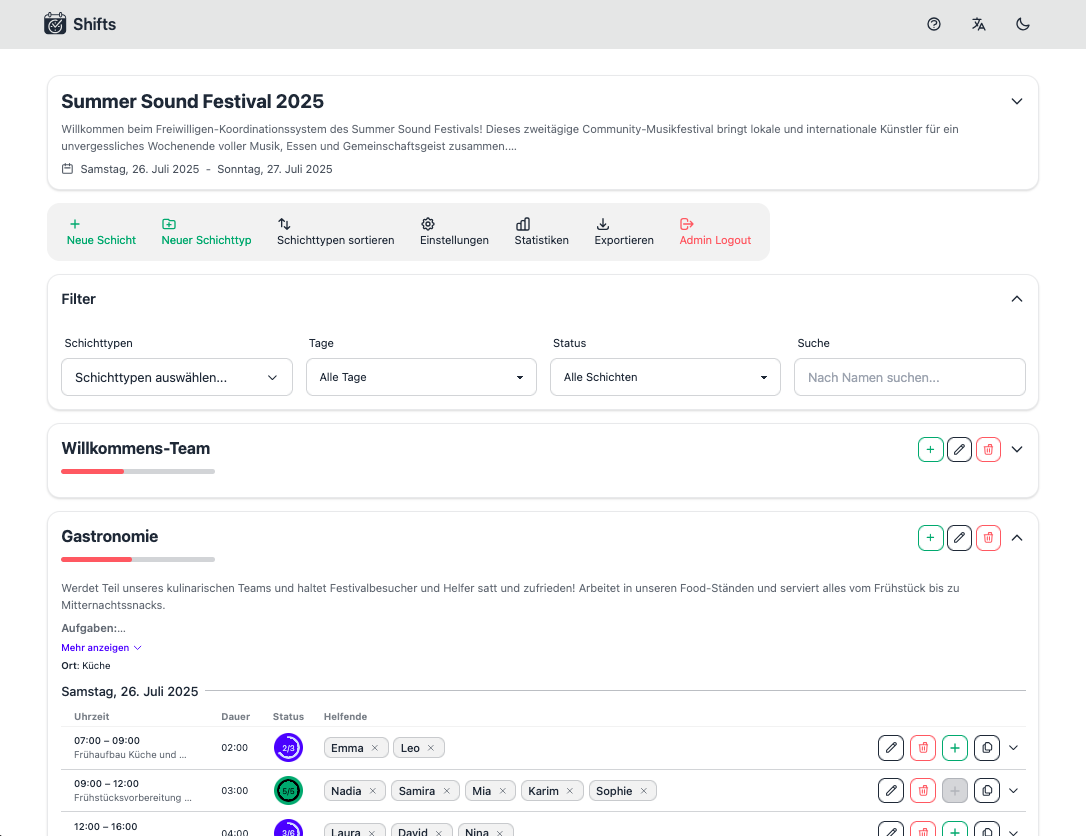
- People sign up for a shift with a name, nickname, or pseudonym. An email address or login is not required. Names that have been used once are automatically suggested when signing up for further shifts.
- Each person can remove themselves or other people at any time. This considerably facilitates the flexible management of shifts.
- Shifts are grouped into shift types (e.g., Bar, Kitchen). Each shift type can be provided with a description text that explains the respective task. Markdown is supported for this purpose.
- Shifts
- Have a defined start time and duration.
- The number of required helpers can be specified. In addition, it is possible to create shifts with unlimited participant numbers. This can be helpful for “All Hands on Deck” situations such as breakdown.
- Like shift types, individual shifts can also be provided with a description text (optionally in Markdown). This allows, for example, the acts or bands appearing during this time to be communicated.
- Filters: The shift plan can be extensively filtered. Specific shift types can be selectively shown and hidden, or filtered according to the occupancy status of the shifts. Filtering by the names of individual helpers is also possible.
- Internationalisation: The application is currently available in German and English.
- Day boundary: Many events last well into the night. Frequently, the early morning hours are organisationally still assigned to the previous day. Shifts makes it possible to define the day boundary individually for each shift plan.
- Admin access: When creating a shift plan, an admin password is automatically assigned. With this, the following functions can be used:
- Creating, editing, and duplicating shifts and shift types.
- Changing the sorting of shift types.
- Adjusting description text, title, day boundary, and further settings of the shift plan.
- Export: The data of the shift plan can be exported in various formats, whereby the current filter configuration can optionally be taken into account. Further information on the export formats can be found below.
- Collaborative planning mode: An optimised mode for shift planning in teams and crews. Further information on this can be found further below.
- Export: After entering the admin password, various export formats are available. On request, the current filter configuration can be taken into account. Available formats:
- JSON: Exports all data of the shift plan in JSON format.
- Open shifts as text file: Exports an overview of open shifts as a text file. This is particularly helpful if the overview is to be shared, for example, in a chat.
- Timetable (PDF): Displays the shifts and their occupancy per day as a timetable (in the style of a school timetable). This particularly supports the planning phase.
- Poster (PDF): At many collective events, it makes sense to switch to a paper-based shift plan after the start of the event, into which people can sign up on site. This export creates such a shift plan. One A4 page is created per day and shift type, which can be printed and hung up.
- Report (PDF): Creates a print-optimised overall view of the shift plan.
- Personal Overview (PDF): A document in A5 format that clearly lists the shifts of a single person.
Collaborative Planning Mode
At events, two fundamentally different types of shifts can be distinguished. Many shift types can be taken on by almost all participants without major coordination. These typically require little preparation or coordination. A classic example of this is washing up. In contrast, there are shifts that are taken on by organised teams or crews. These often require preparation and coordination. Shifts wants to do justice to both groups and therefore offers an optional collaborative planning mode for crews. This can be activated in the shift plan settings.
The collaborative planning mode differs from the normal mode, in which the aim is to fill all shifts as quickly as possible according to the first-come-first-served principle. The collaborative mode, by contrast, is based on a two-stage process:
- All people can initially express interest in a shift. Shifts can be deliberately “overbooked” in this mode. In this way, the needs and wishes of all crew members are made transparent.
- Based on the expressed interests, the team can now decide which shifts are concretely filled how. The corresponding changes are made in the shift plan. Finalised shifts can be fixed or locked by the admin. After that, they are no longer changeable for regular users. Fixed shifts are highlighted in colour.
This makes it clear to all participants at all times which shifts are definitively assigned. Since people can no longer remove themselves from fixed shifts independently, they are motivated to contact their crew coordination for necessary changes.
For Users
Lorem ipsum dolor sit amet, consectetur adipiscing elit, sed do eiusmod tempor incididunt ut labore et dolore magna aliqua. Ut enim ad minim veniam, quis nostrud exercitation ullamco laboris nisi ut aliquip ex ea commodo consequat.
Signing Up for and Leaving Shifts
Lorem ipsum dolor sit amet, consectetur adipiscing elit, sed do eiusmod tempor incididunt ut labore et dolore magna aliqua. Ut enim ad minim veniam, quis nostrud exercitation ullamco laboris nisi ut aliquip ex ea commodo consequat.
Filtering
For Admins
Lorem ipsum dolor sit amet, consectetur adipiscing elit, sed do eiusmod tempor incididunt ut labore et dolore magna aliqua. Ut enim ad minim veniam, quis nostrud exercitation ullamco laboris nisi ut aliquip ex ea commodo consequat.
Creating a New Plan
Lorem ipsum dolor sit amet, consectetur adipiscing elit, sed do eiusmod tempor incididunt ut labore et dolore magna aliqua. Ut enim ad minim veniam, quis nostrud exercitation ullamco laboris nisi ut aliquip ex ea commodo consequat.
Creating and Editing Shift Types and Shifts
Lorem ipsum dolor sit amet, consectetur adipiscing elit, sed do eiusmod tempor incididunt ut labore et dolore magna aliqua. Ut enim ad minim veniam, quis nostrud exercitation ullamco laboris nisi ut aliquip ex ea commodo consequat.
Settings
Lorem ipsum dolor sit amet, consectetur adipiscing elit, sed do eiusmod tempor incididunt ut labore et dolore magna aliqua. Ut enim ad minim veniam, quis nostrud exercitation ullamco laboris nisi ut aliquip ex ea commodo consequat.
Statistics
Export
Lorem ipsum dolor sit amet, consectetur adipiscing elit, sed do eiusmod tempor incididunt ut labore et dolore magna aliqua. Ut enim ad minim veniam, quis nostrud exercitation ullamco laboris nisi ut aliquip ex ea commodo consequat.
JSON
Lorem ipsum dolor sit amet, consectetur adipiscing elit, sed do eiusmod tempor incididunt ut labore et dolore magna aliqua. Ut enim ad minim veniam, quis nostrud exercitation ullamco laboris nisi ut aliquip ex ea commodo consequat.
Open Shifts as Text File
Lorem ipsum dolor sit amet, consectetur adipiscing elit, sed do eiusmod tempor incididunt ut labore et dolore magna aliqua. Ut enim ad minim veniam, quis nostrud exercitation ullamco laboris nisi ut aliquip ex ea commodo consequat.
Timetable (PDF)
Lorem ipsum dolor sit amet, consectetur adipiscing elit, sed do eiusmod tempor incididunt ut labore et dolore magna aliqua. Ut enim ad minim veniam, quis nostrud exercitation ullamco laboris nisi ut aliquip ex ea commodo consequat.
Poster (PDF)
Lorem ipsum dolor sit amet, consectetur adipiscing elit, sed do eiusmod tempor incididunt ut labore et dolore magna aliqua. Ut enim ad minim veniam, quis nostrud exercitation ullamco laboris nisi ut aliquip ex ea commodo consequat.
Report (PDF)
Lorem ipsum dolor sit amet, consectetur adipiscing elit, sed do eiusmod tempor incididunt ut labore et dolore magna aliqua. Ut enim ad minim veniam, quis nostrud exercitation ullamco laboris nisi ut aliquip ex ea commodo consequat.
Personal Overview (PDF)
Lorem ipsum dolor sit amet, consectetur adipiscing elit, sed do eiusmod tempor incididunt ut labore et dolore magna aliqua. Ut enim ad minim veniam, quis nostrud exercitation ullamco laboris nisi ut aliquip ex ea commodo consequat.